1 July 2024
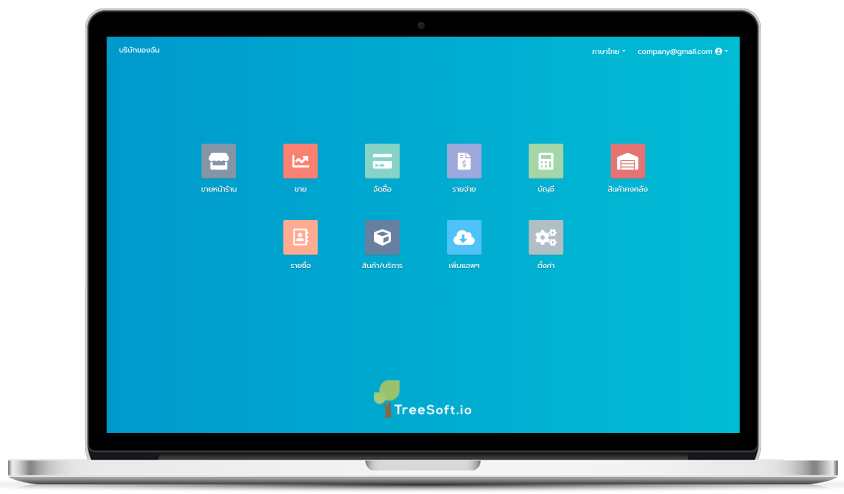
Business organizations, whether large or small, require effective business management systems such as ERP (Enterprise Resource Planning). But what exactly is ERP and why is it essential for SMEs?Business management, regardless of size, involves handling detailed processes. The more intricate these processes are, the more challenging they become to manage. Critical data may become fragmented or time-consuming to handle, which can disrupt business operations and efficiency. Therefore, efficient business management systems like ERP are crucial for all organizations, including SMEs.What is ERP?ERP, or Enterprise Resource Planning, simplifies business process management by integrating various functions such as finance, sales, procurement, inventory management, payroll, HR, data management, and more into a unified system.Popular Types of ERP Systems:1. On-Premise ERPInstalled directly on a company's hardware and servers, requiring IT staff for maintenance and incurring higher costs.2. Cloud-Based ERPHosted on cloud servers, accessible via the internet from multiple devices without the need for extensive IT infrastructure, offering pricing or cost-effective solutions.Suitability of ERP SystemsOn-Premise ERP: Suitable for large organizations with extensive data needs like manufacturing firms, financial institutions, and hospitals.Cloud-Based ERP: Ideal for medium to small enterprises (SMEs) due to lower upfront costs, minimal IT staff requirements, and scalability.Benefits of ERPEnhanced Efficiency: Improves workflow efficiency and data accuracy by streamlining processes such as payroll, purchasing, and sales.Enhanced Efficiency: Improves workflow efficiency and data accuracy by streamlining processes such as payroll, purchasing, and sales.Improved Data Accuracy: Minimizes data errors and ensures consistent information across departments.Improved Data Accuracy: Minimizes data errors and ensures consistent information across departments.Flexibility: Adaptable to business growth or scaling down without major IT investments.Cost Savings: Reduces operational costs and IT maintenance expenses, especially with Cloud-Based ERP.Better Communication: Facilitates efficient data sharing and collaboration across departments such as inventory, sale or procurement.Integrated Data Management: Centralizes financial, sales, customer, inventory, and HR data for easier access and management.Data Security: Offers robust security measures to protect sensitive business information.Treesoft.io ERP Software HighlightsTreesoft.io offers a Cloud-Based ERP solution tailored for SMEs, featuring over 10 essential business applications such as point of sale, sales management, procurement, payroll, accounting, inventory control, HR management, customer management, and product/service management.Conclusion:In the fast-paced business environment, both large enterprises and SMEs require agile and accurate management systems. ERP software plays a pivotal role in ensuring efficient management of various business processes, enhancing productivity, and facilitating growth. For SME owners looking to streamline operations, Treesoft.io provides an accessible, user-friendly ERP solution with a 14-day free trial and no feature limitations, making it easy to get started without upfront costs, signup now.
7 April 2025
A Payment Entry is a document used to record customer receipts or payments to vendors within an accounting or ERP system to accurately and comprehensively track financial status.
Types of Payment Entries
Receive Payment: Used to record payments received from customers, such as cash, bank transfers, or checks.
Make Payment: Used to record payments made to vendors or creditors, such as for goods, services, or general expenses.
Information Typically Found in a Payment Entry
Payment date
Name of the recipient or payer
Amount paid
Method of payment, such as cash, bank transfer, or check
Reference document numbers, such as invoices
Related bank or cash accounts
Benefits of Payment Entries
Enables real-time tracking of the business's financial status
Links with other accounting documents such as invoices, purchase orders, expense reports, and pay slips
Reduces errors in financial record-keeping
Serves as evidence for auditing purposes
Aids in cash flow planning
Summary
The payment entry is one of the key documents used to manage the financial inflow and outflow information of an organization. When used alongside an ERP or accounting system, it enhances accuracy, transparency, and efficiency in financial management significantly.
4 January 2025
One software that is important for both retail businesses and restaurants is the Point of Sale (POS) system. So, what exactly is a POS system, and what are its benefits?
It is believed that nearly every business owner knows that competition is high these days. Many businesses thrive, while others fail for various reasons. One of those reasons may be a failure to adapt to new technologies or to use software that can facilitate business operations. One program that is essential for SME businesses, retail stores, restaurants, and even large businesses is the Point of Sale (POS) system, which is part of an ERP system. So, what exactly is a POS system, and how can it benefit your business?
What is a POS (Point of Sale) System?
The POS system is a payment and sales management system used at the counter to handle customer orders, check inventory, and more. The POS system works with hardware like receipt printers, cash drawers, and barcode scanners, which we often see used by employees at restaurants and retail stores in shopping malls.
Functions of a POS System
The POS system has many functions that are very beneficial for retail and restaurant businesses. These include:
1. Stock management
The POS system helps update inventory and, with a Cloud-Based ERP system, integrates the POS system with inventory management, allowing for real-time updates and automatic stock deductions.
2. Payment and receipt generation
The POS system simplifies payment processing, including barcode scanning, total calculations, payment processing through various channels, applying discounts or coupons, calculating VAT, and issuing receipts.
3. Sales report tracking
The POS system helps monitor sales performance, calculate daily sales, and provides an overview of total sales. This data can be used to track income and expenses, log daily transactions, and compare total sales against cash in the drawer.
4. Customer data management
The system stores customer data, such as purchase history, contact details, loyalty points, coupons, and discounts, as well as customer feedback, which can help improve service and products in the future.
5 Reasons Why Your Store Should Use a POS System
1. Increased operational efficiency – With a POS system, you can quickly process payments, issue receipts, and track sales and customer information. This is automated, reducing errors.
2. Accurate inventory management – Prevent stock shortages or overstocking because the POS system is real-time and integrates with inventory management software, automatically updating stock levels.
3. Comprehensive data insights – Sales data can be used for performance reporting, and inventory data can help manage stock levels, enabling more accurate business forecasting.
4. Access information at any time – Cloud-Based POS systems allow you to access data whenever you have an internet connection.
5. Integration with other programs – POS systems can connect to inventory software, stock management programs, and other ERP systems. By using a POS system, you can enhance business operations, streamline stock management, improve customer satisfaction, and gather data to drive business growth and sales.
What Features Does Treesoft.io's POS System Have?
The POS software from Treesoft.io allows you to take orders, process payments, issue receipts, and connect with hardware like barcode scanners, receipt printers, and cash drawers. It works on all devices, including tablets, laptops, and computers.
Features of Treesoft.io's POS System
Import products via Excel
Daily sales summary feature
Works offline during internet outages
Supports up to 80 tables for restaurant management
Records dining times (for buffets)
Sales can be divided into shifts (morning, evening)
Generates both paper and digital receipts (paperless)
Automatically deducts stock, integrates with inventory management
Has a product return and order deletion feature
Unlimited product additions
Add new customers immediately and integrate with CRM applications
Coupon and discount system
Automatically calculates VAT
Summary
The POS system is a powerful tool that helps with sales, inventory management, and data collection. For store and restaurant owners, Treesoft.io offers a POS system designed to be user-friendly, ideal for beginners, and easy to implement. You can sign up for a free 14-day trial without limitations on features.
4 January 2025
In 2025, the food business landscape is evolving rapidly, especially after the COVID-19 pandemic, which altered consumer behavior and accelerated the adoption of digital technology. One essential technology that restaurants should adopt to navigate this transformation is an "Online Menu System." This tool enhances convenience and customer experience while improving operational efficiency for restaurants.
Benefits of an Online Menu System
Enhances customer convenience
Customers can access the menu directly through their smartphones or other devices without waiting for staff to provide a physical menu. This system also reduces direct contact, aligning with the increased focus on hygiene.
Quick menu updates
Restaurants can modify or update their menus in real time, whether adding new dishes, changing prices, or notifying customers about temporarily unavailable items, minimizing errors in providing information.
Boosts sales through special menu recommendations
Online menus can highlight promotions or suggest special dishes to customers, such as popular items, new dishes, or seasonal offerings. Additionally, appealing food images can encourage more orders.
Reduces long-term costs
Using an online menu system eliminates the need for printed menus, reducing printing costs and issues related to damaged or lost menus. It also eases the workload for restaurant staff.
Key Features of an Online Menu System
Supports multiple languages
Since restaurants may serve international customers, the system should include a language translation feature to enhance usability.
Integration with payment systems
To make transactions seamless, the system should connect with online payment methods such as QR code payments, credit cards, or e-wallets.
User-friendly design
The interface should be intuitive, with well-organized menus and quick access to information.
Customer data management
Restaurants can utilize the system to collect data on customer ordering behaviors, enabling them to analyze and adjust their marketing strategies.
Implementing an Online Menu System in Restaurants
Getting started with an online menu system is easier than it seems. Restaurants can opt for reliable software developers or existing platforms in the market. By connecting the system to a Wi-Fi network and the restaurant's mobile devices, it can be operational immediately.
An online menu system is an essential tool for restaurants in 2025. It not only enhances customer convenience but also enables restaurants to adapt effectively to the digital era. Investing in this technology is a step toward future success in the food business.
What Makes Treesoft.io's Online Menu System Stand Out?
- If you are already using Treesoft's POS system, you can activate the "Online Menu" system instantly.
- Configure QR code types, such as single-use or reusable, to suit any restaurant type.
- Real-time order management allows customers to specify order details, such as "no vegetables."
- Merchants can edit product information at any time, such as discounts or prices.
- Reduces costs in the long run, benefiting both front-end and back-end operations.
- Sign up for a free 14-day trial with no feature limitations.